We make SSmd, one of the apps below, so read that section knowing who wrote it. We have written real documents in all the others too, and we tried to describe each the way its own users would. Every price comes from the app's official site and was checked on October 15, 2026.
Feature lists won't separate these apps much, because they all do headings, lists, links and tables. Three questions narrow it down faster.
Three questions that decide it
Where should your files live?
Some apps edit plain .md files in a folder you pick. Finder can see them, Git can track them, iCloud Drive or Dropbox can sync them, and if you change apps in five years you take the folder with you. Typora, Obsidian, iA Writer, MarkEdit, MarkText and SSmd work this way.
Bear keeps notes in its own database and exports Markdown when you ask. Ulysses has its own library too. It can work in external folders of Markdown files, but its help pages say some features are limited there. A library isn't a bad design: tags, search and sync are simpler when the app owns the storage. It just means your writing lives in the app rather than on disk.
Do you want to see the markup?
Some apps always show the # and * and style the text around them, so headings are bigger and emphasis looks emphasized. iA Writer, Ulysses and MarkEdit work like this, and iA Writer adds a separate preview.
Others hide the symbols and bring them back only where you are editing. Typora, Obsidian's Live Preview, Bear with Hide Markdown turned on, MarkText and SSmd all do this, each a little differently.
If you edit READMEs or other people's Markdown, seeing every symbol is reassuring, because nothing is hidden from you. If you write long prose, hidden markup lets the page read like a page.
What else does it need to do?
This is often the question that settles it.
- Notes that link to each other, with backlinks and a graph: Obsidian is built for this.
- Publishing straight to WordPress, Ghost or Medium: Ulysses.
- Diagrams and math inside documents: Typora, Obsidian, MarkText and SSmd render Mermaid diagrams and LaTeX. If you haven't used Mermaid, here is how it works.
- Windows or Linux as well: Typora, Obsidian and MarkText. iA Writer sells separate versions for other platforms.
- iPhone and iPad: Obsidian, iA Writer, Bear and Ulysses.
The apps
Typora
Typora made hidden markup popular, and it is still the app most people mean when they say "WYSIWYG Markdown". It costs $14.99 once for up to three devices, has a 15-day trial, and runs on Mac, Windows and Linux. It handles math, Mermaid, flowcharts and sequence diagrams, exports PDF and HTML, and exports Word and other formats through Pandoc.
It is built on Electron, which shows mostly in memory use and in small ways it behaves differently from other Mac apps. Some people notice; many never do. If you move between a Mac and a Windows PC, it is the easiest recommendation here. typora.io
Obsidian
Obsidian is free, including for work; the commercial license is now optional. Sync starts at $4 a month billed yearly ($5 month to month), and Publish is $8 a month billed yearly ($10 month to month). A vault is a folder of Markdown files, so leaving is easy.
Its strength is everything around the writing: links between notes, backlinks, a graph view, canvases, and thousands of community plugins. Live Preview shows formatting and reveals the syntax near the cursor. The other side of that is that Obsidian is a system you assemble. Some people enjoy that. Others end up spending more time on plugins than on notes. Like Typora, it runs on Electron. obsidian.md
iA Writer
iA Writer costs $49.99 once on the Mac, with a two-week trial. The iPhone and iPad, Android and Windows versions are bought separately. It is native and quick, and it has some of the most careful typography of any writing app.
You see your Markdown, styled, and the formatted result lives in a separate preview. Focus mode dims everything except the sentence you are on, and Style Check marks filler words, redundancies and clichés. It suits writers who want fewer settings, and it is priced for them. ia.net/writer
Bear
Bear is a notes app first. The free version works on one device. Bear Pro, at $2.99 a month or $29.99 a year, adds sync across Mac, iPhone and iPad, more export formats and themes. Notes live in Bear's database and are organized with tags, and with Hide Markdown on it feels a lot like Typora.
It is one of the best-looking apps on the Mac. If you mostly write short notes and want them on your phone, it's a strong pick. If you want a folder of .md files on disk, you'll be exporting. bear.app
Ulysses
Ulysses costs $5.99 a month or $39.99 a year and runs on Mac, iPad and iPhone. Your texts sit in its own iCloud library, it tracks writing goals, and it publishes directly to WordPress, Ghost and Medium. It uses its own dialect, Markdown XL, which adds things like comments and annotations.
People writing books, theses and long blog series tend to stay with it for years. You pay by subscription, and your texts are most at home inside its library. ulysses.app
MarkEdit
MarkEdit is free and open source under the MIT license. It is small and starts quickly, built on CodeMirror 6: you edit Markdown source with syntax highlighting, and a preview comes from extensions rather than the app itself. The current version needs macOS 26; older releases still run on macOS 12 to 15.
Think of it as TextEdit for Markdown. If you're comfortable reading raw Markdown, it may be all you need. MarkEdit on GitHub
MarkText
MarkText is a free, open-source editor in Typora's style, built on Electron, for Mac, Windows and Linux. Its last release before this year was 0.17.1, in 2022. Version 0.19.0 came out on May 28, 2026. It's good to see it moving again, but look at the release history before you depend on it. MarkText on GitHub
SSmd
SSmd is ours. It's a native Mac app built with SwiftUI and AppKit, free on the Mac App Store, for macOS 14 or later. Markdown symbols appear only on the line you are editing. The rest of the document stays typeset, so it reads like a page while you write. Files are plain .md in folders you choose.
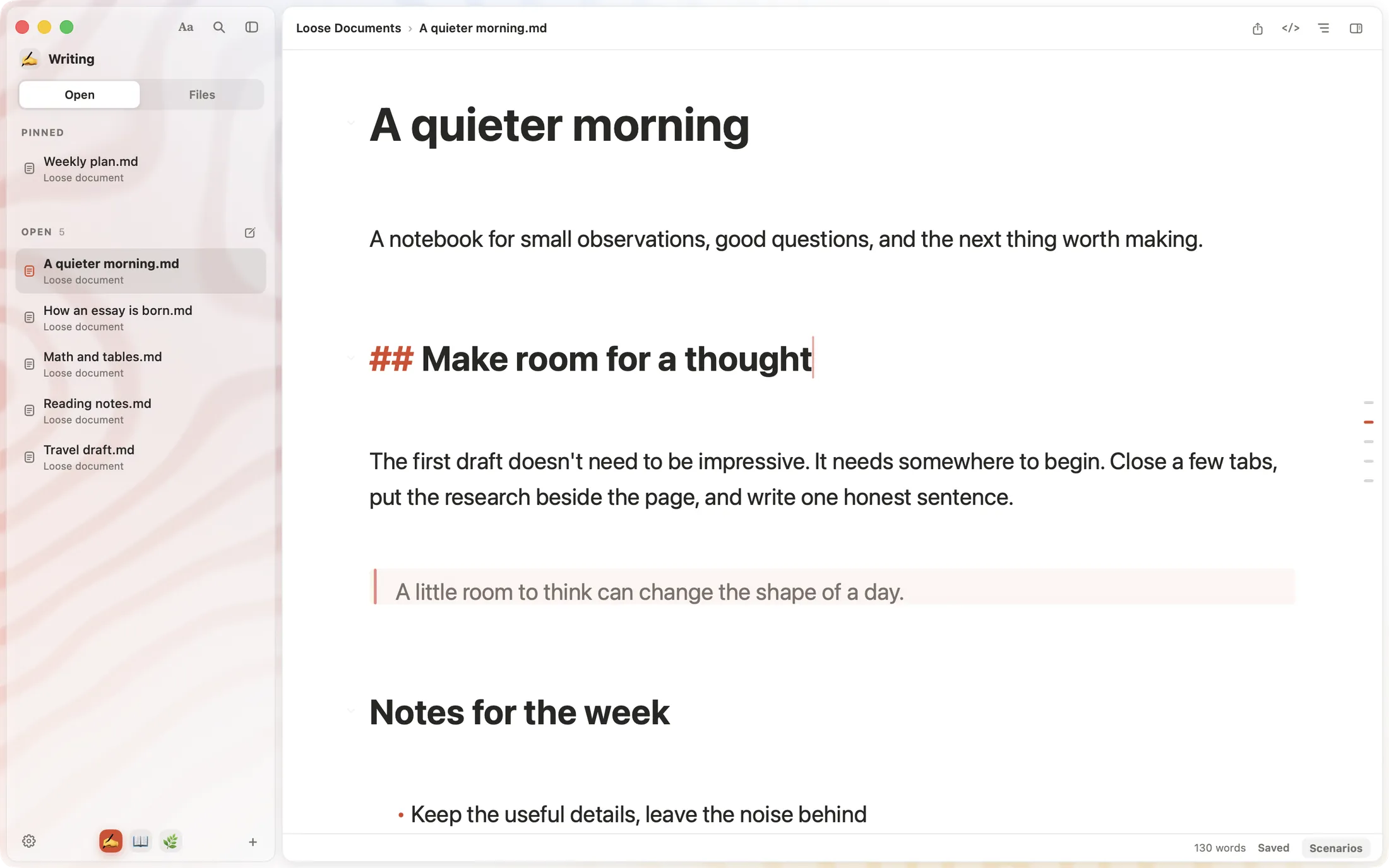
Beyond the basics:
- ⌘P opens any document by name. It also imports: paste a web address, or a Word, Excel or PDF file, and you get Markdown.
- Mermaid, flowchart and sequence diagrams, LaTeX math and tables render where you write them.
- Local History keeps a revision each time you save. You can compare two versions side by side and restore an old one. It stays on your Mac.
- Spaces keep projects apart, each with its own documents and reading positions.
Where it falls short:
- Mac only. There is no iPhone or iPad app.
- No sync of its own. Put your folder in iCloud Drive or Dropbox, or use Git.
- Export is PDF or Markdown. No HTML or Word export yet.
- No plugins.
- It is at version 0.5, which is young. You may hit rough edges, and we'd like to hear about them.
SSmd is free right now. A paid version is planned, and its pricing will be announced before it launches.
Side by side
| App | Price on Mac | Where files live | How Markdown shows | Platforms |
|---|---|---|---|---|
| Typora | $14.99 once, 3 devices | .md files in your folders | Hidden, shown while editing | Mac, Windows, Linux |
| Obsidian | Free; Sync and Publish extra | A vault: a folder of .md files | Live Preview hides it; source mode too | Mac, Windows, Linux, iOS, Android |
| iA Writer | $49.99 once | .md files | Styled source, separate preview | Mac; other platforms sold separately |
| Bear | Free; Pro $29.99/year | Bear's database | Styled; can hide markup | Mac, iPhone, iPad |
| Ulysses | $39.99/year | Its iCloud library, or external folders | Styled source, Markdown XL | Mac, iPhone, iPad |
| MarkEdit | Free, open source | .md files | Source with highlighting | Mac |
| MarkText | Free, open source | .md files | Hidden, shown while editing | Mac, Windows, Linux |
| SSmd | Free for now | .md files in your folders | Only on the line you're editing | Mac |
Prices are in US dollars from each official site on October 15, 2026. Mac App Store prices in other countries differ.
Which one?
- You also use Windows or Linux: Typora.
- You want linked notes and enjoy setting things up: Obsidian.
- You write long pieces that end up on a blog: Ulysses.
- You want quick notes on every Apple device and don't need files on disk: Bear.
- You like raw Markdown and don't want to pay: MarkEdit.
- Typography and focus matter most, and the price doesn't bother you: iA Writer.
- You write on a Mac, want plain files, and want the markup out of the way: try SSmd. It's free, so finding out costs you one download.
New to Markdown itself? Start with how to write Markdown on a Mac.
Prices and system requirements change, and we'll update this page when they do. If you spot something out of date, write to [email protected].